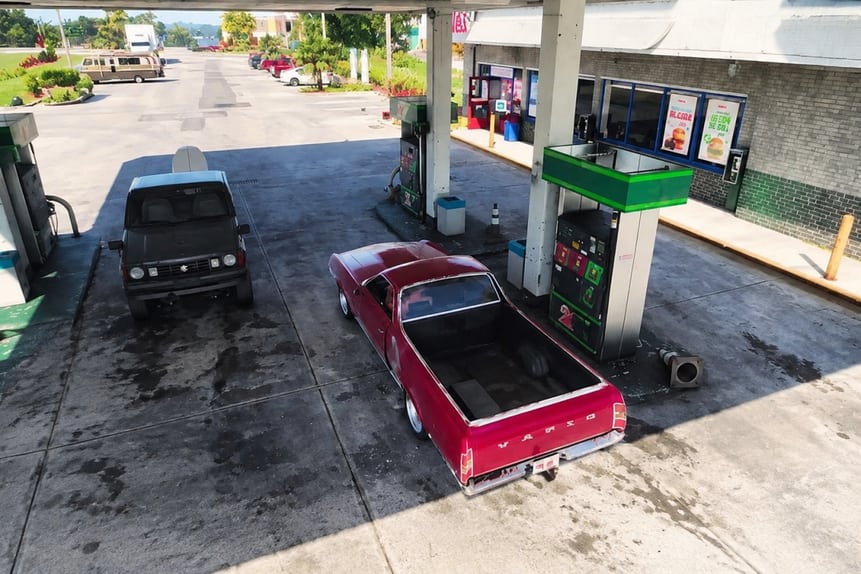
GTA 6 Vehicle Fuel Guide: Gas Stations, Fuel Costs, and Refueling
GTA 6 uses a working vehicle fuel system. Refueling is part of driving, but it is not a chore you need to repeat after every short trip. Cars with a full tank can travel for a substantial period, while a vehicle stolen from a stranger may already be nearly empty. That difference matters more than simply choosing the fastest car nearby.
For players budgeting their GTA 6 Money, fuel is worth treating as a practical travel expense rather than a reason to interrupt every journey. Plan a stop when you need one, check the displayed charge, and avoid spending on a temporary vehicle without considering how long you intend to keep it.
Does GTA 6 Require Regular Refueling?
Yes, vehicles need fuel, but frequent stops are not the intended rhythm of ordinary driving. The system becomes more relevant when you take an unfamiliar car during a getaway without checking its condition.
Do not translate that into a fixed maintenance schedule. A rule such as “refuel after every mission” adds unnecessary stops and assumes that every journey uses the same amount.
A more useful approach is to match your preparation to the trip:
| Your next activity | Suggested preparation |
| A short drive to a nearby destination | Avoid making a separate service trip without a reason. |
| An extended exploration session | Identify a convenient stop before adding distant detours. |
| A journey in an unfamiliar vehicle | Assess the replacement before committing to it. |
| A mission using a car you choose yourself | Handle routine servicing before starting the activity. |
These are planning suggestions, not mission requirements or measured fuel-consumption rules.
Gas Station Locations: Use the In-Game Map
Look for gas-pump symbols on the map to find a refueling location. For an electric vehicle, look for a charging station instead.
Choose a Stop Along Your Route
For a long drive, compare the station’s location with the roads you intend to use. A nearby marker may still require a less convenient approach than a station slightly farther ahead.
Before setting a waypoint, consider:
- Which side of the road provides access.
- Whether the stop sends you away from your destination.
- Whether you want to continue exploring afterward or return directly.
- Whether the vehicle is worth keeping for the rest of the journey.
This guide does not provide an unverified station-by-station directory. Use confirmed map markers rather than invented addresses or coordinates.
How to Refuel a Car
The refueling interaction begins at the pump:
- Pull close enough for the Services prompt.
- Choose Refuel and check the displayed price.
- Activate the interaction.
- Hold the control shown on screen during filling.
- Let the sequence finish before continuing your drive.
Follow the controls displayed by your game rather than assuming a button listed for another platform will apply.
Charging an Electric Vehicle
At a charging station, select Charge Vehicle and review the cost. Wait for charging to finish before leaving.
For route planning, treat charging and refueling as different service needs. Pick the stop that matches the vehicle you are actually driving.
Fuel Costs and Service Choices
The service menu displays the refueling charge before you proceed. Fuel and repairs are separate options, so selecting one should not be treated as selecting both.
A universal price list would require more evidence than a single service quote. This guide does not assign a fixed cost per tank, claim that one station brand is cheaper, or promise discounts for visiting at a particular time.
Before paying, ask two practical questions:
- Am I keeping this vehicle? Spending on a car you plan to abandon immediately may not suit your budget.
- Which service do I actually need? Read the selected option instead of confirming the menu automatically.
Avoid basing a travel budget on supposed premium-fuel bonuses, regional price differences, or exact mileage figures unless those details have been verified for the version you are playing.
Long-Distance Driving Without Unnecessary Stops
Everyday Trips
Do not turn every local errand into a maintenance run. If you decide to service a vehicle, try to combine the stop with a journey already taking you past a station.
Cross-Region Exploration
Plan around the route you intend to drive, not an invented maximum range. Mark a convenient service location before leaving, then reconsider your route if sightseeing adds a substantial detour.
Keep the return journey in mind too. Reaching a remote destination is only part of the outing if you intend to bring the same car back.
Mission Preparation
When an activity lets you choose your own transport, settle routine vehicle needs before triggering it. That avoids choosing between continuing the objective and making an inconvenient detour.
This advice does not establish that every mission handles fuel identically. Do not assume a scripted vehicle, checkpoint restart, or mission transition follows the same rules without checking that specific situation.
Avoid Unsupported Fuel-Saving Claims
Searches for cheap GTA 6 Money are not a substitute for checking the service quote in your own game. For a driving budget, compare the immediate expense with how much use you expect to get from the vehicle, rather than relying on advertised savings or an unsupported price table.
Before a longer outing, choose your transport, locate a suitable service stop, and decide which detours you want to make. If you switch cars halfway through, reassess the journey instead of assuming the replacement is ready to finish it.